Flutter vs React Native in 2026: Which One Should You Learn?

Flutter vs React Native in 2026: Which One Should You Learn?
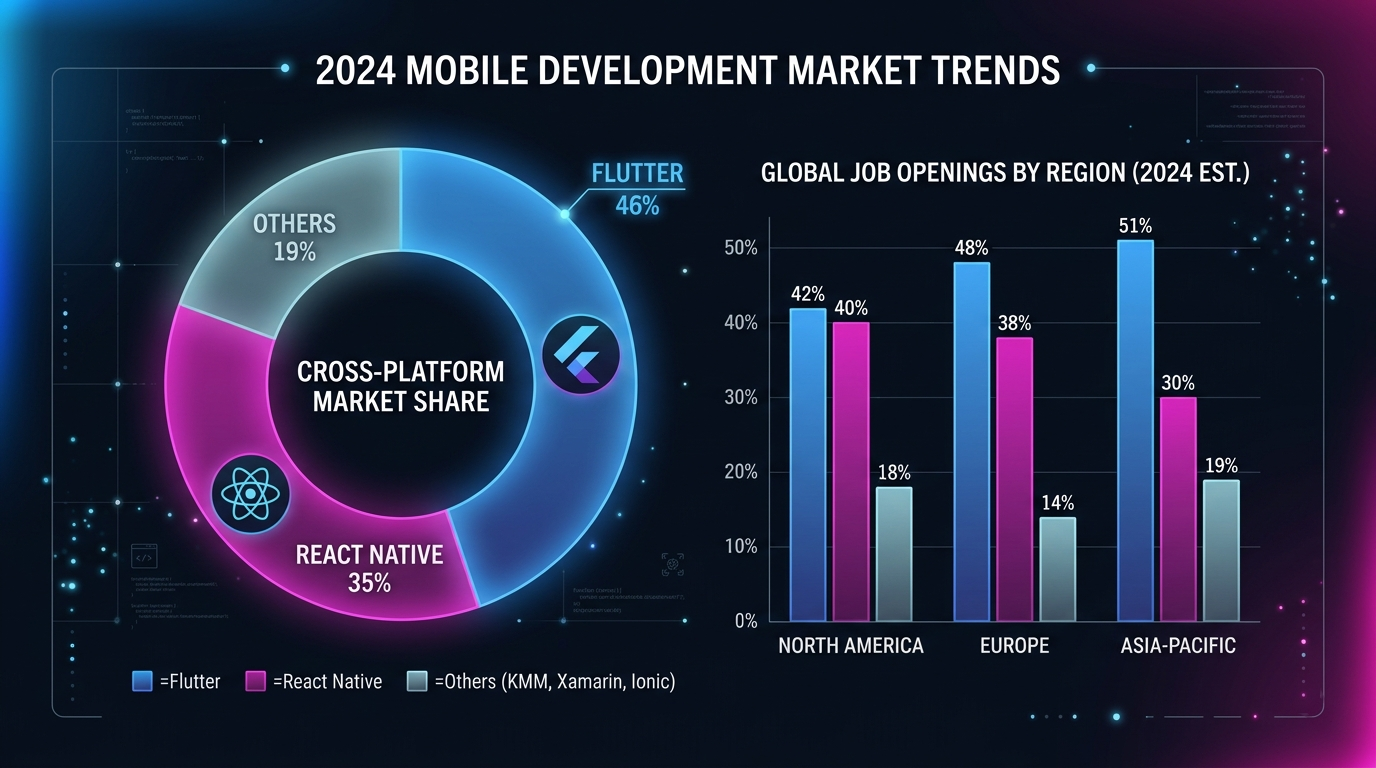
The cross-platform debate is louder than ever. Flutter now holds roughly 46% of the cross-platform market while React Native sits at around 35% — yet React Native still dominates job boards with nearly double the open positions. One framework is technically superior in benchmarks. The other has the biggest developer hiring pool on the planet. Neither is going away.
If you are a student deciding on your first framework, a freelancer picking the stack that will land you more clients, or a startup founder choosing the technology your product will live on for the next five years, this comparison will give you the data, the code, and the honest verdict you need.
I have been building production Flutter apps , an AI-powered exam prep app on Google Play — and I have worked with both ecosystems long enough to know that "which is better" is the wrong question. The right question is "which is better for you."
Let's break it down.
What Is Flutter?
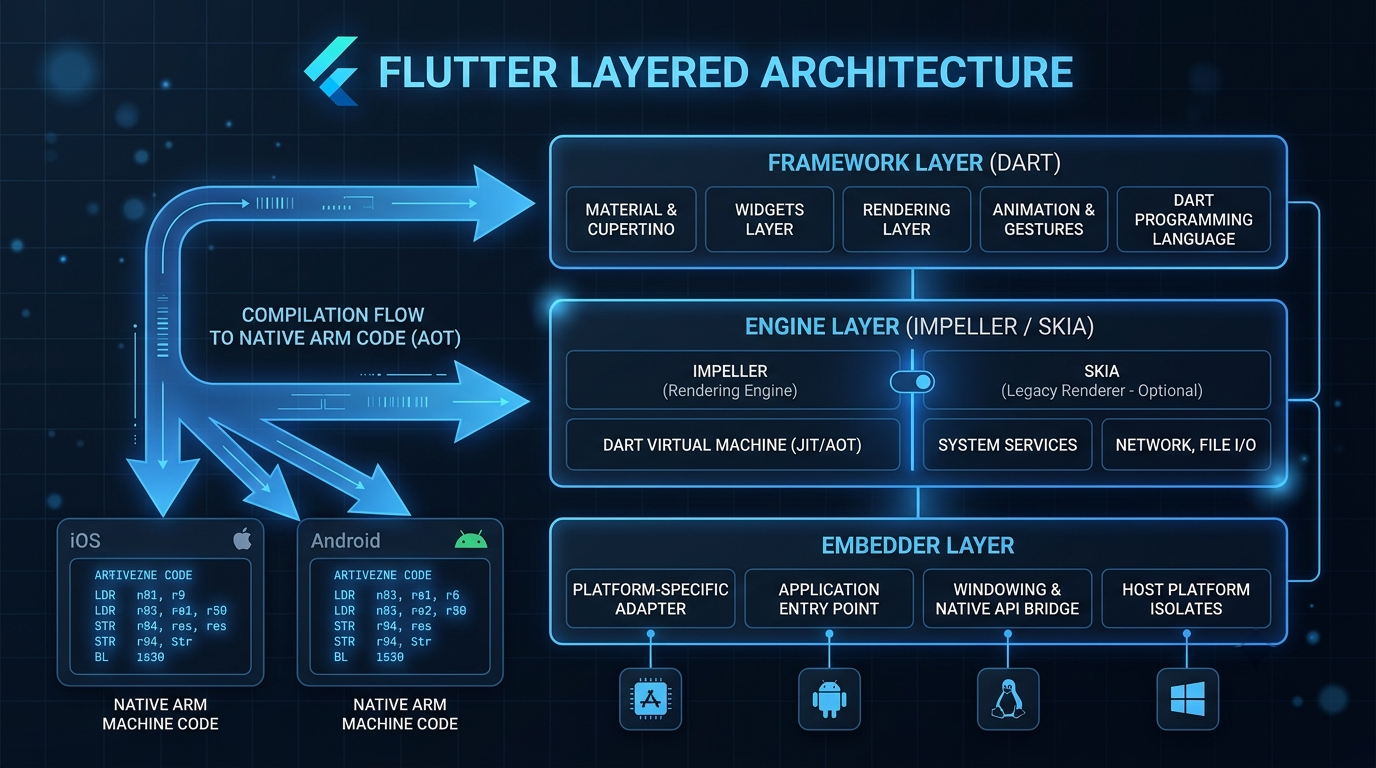
Flutter is Google's open-source UI toolkit for building natively compiled applications from a single codebase. It uses Dart as its programming language and renders every pixel on screen through its own engine — first Skia, and now the Impeller rendering engine introduced in Flutter 3.x.
Unlike most cross-platform frameworks, Flutter does not rely on native platform components. It draws its own widgets using a custom rendering pipeline, which means your app looks identical on iOS, Android, web, macOS, Windows, and Linux.
Advantages of Flutter
Pixel-perfect consistency. Because Flutter paints its own widgets, there is zero visual difference between your iOS and Android builds. Designers love this.
The Impeller engine. Flutter's new rendering engine eliminates shader compilation jank entirely. In production, you get consistent 60–120 FPS with no frame drops on first run — a problem that plagued the old Skia backend for years.
True multi-platform. A single Flutter codebase can target mobile, web, desktop (Windows, macOS, Linux), and embedded devices. No other framework matches this breadth from a single project.
Dart's developer experience. Dart is a modern, strongly typed language with sound null safety, excellent async/await support, and a learning curve that takes days, not weeks. If you know Java, Kotlin, Swift, or TypeScript, you will pick up Dart fast.
Riverpod and the state management ecosystem. Flutter's state management has matured dramatically. Riverpod 2.0 provides compile-time safe, testable state management that scales from a todo app to a production SaaS product. (See: Flutter Riverpod 2.0 Complete Guide for Beginners)
Disadvantages of Flutter
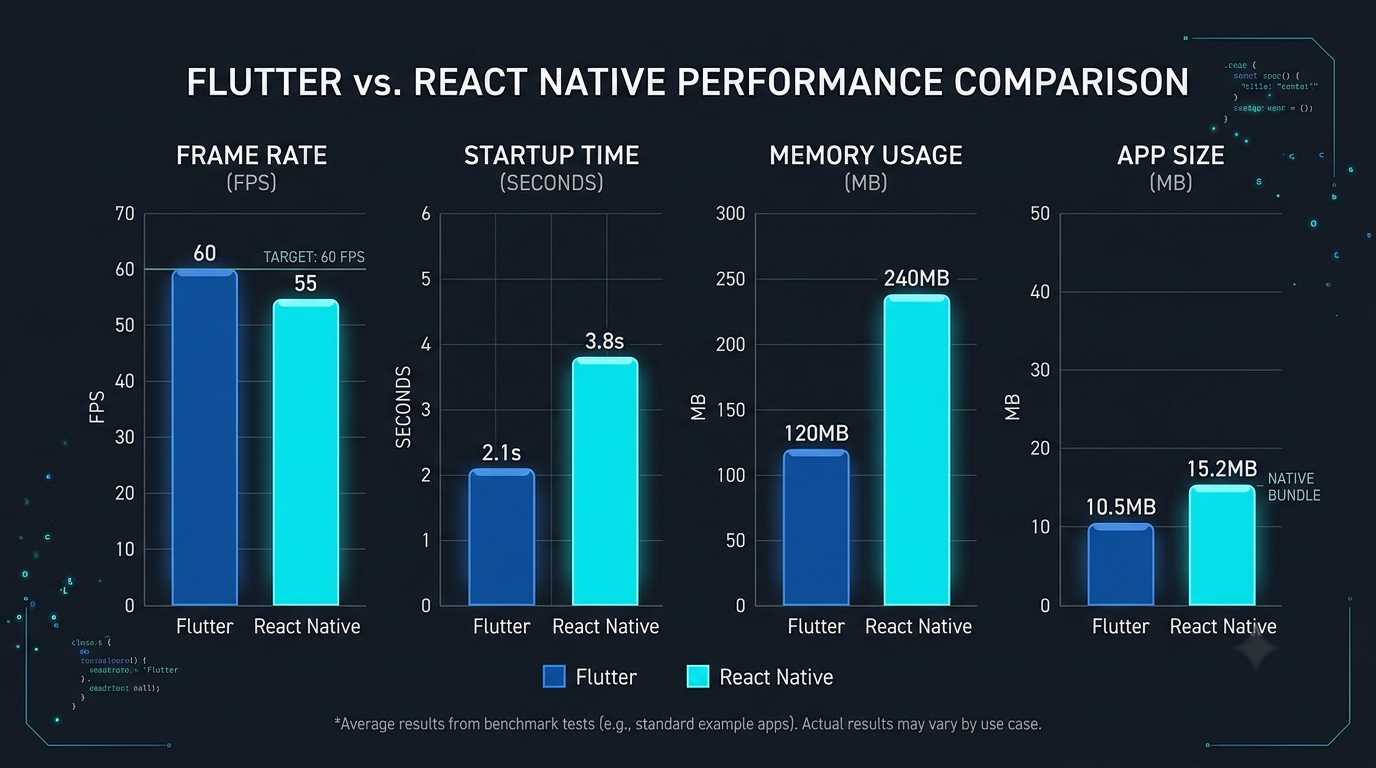
Larger app size. A minimal Flutter app ships at around 15–20 MB because it bundles the entire rendering engine. React Native can start closer to 7–10 MB.
Smaller job market (for now). Despite its popularity among developers, Flutter has roughly 3,200 job listings in the US and Canada compared to React Native's 6,800. The gap is closing, but it is still real.
Web support is functional, not dominant. Flutter web works well for app-like experiences and dashboards, but it is not a replacement for a traditional React or Next.js website. SEO and initial load times remain weaker than JavaScript-based alternatives.
Fewer third-party packages than npm. Pub.dev is growing quickly but does not match the sheer volume of npm, where React Native developers can pull from the entire JavaScript ecosystem.
What Is React Native?
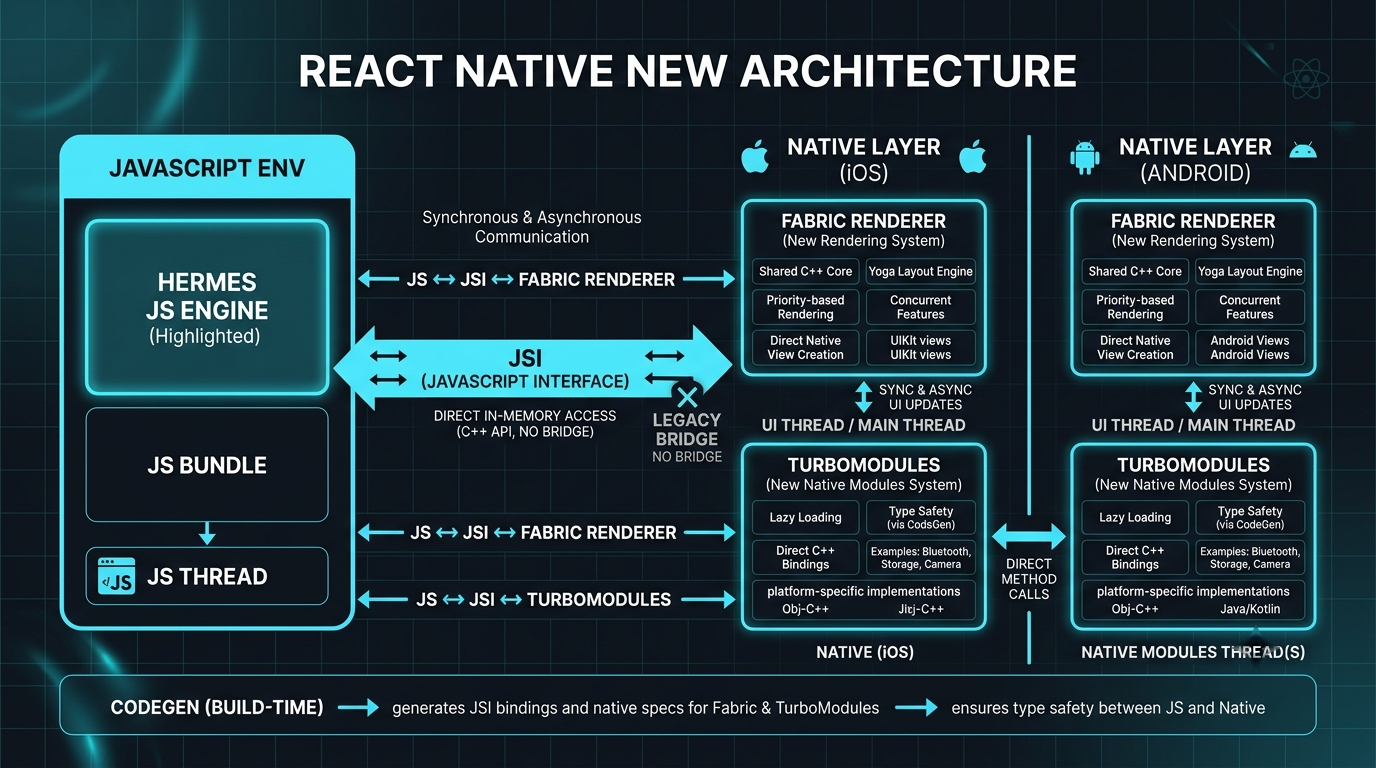
React Native is Meta's open-source framework for building mobile apps using JavaScript (or TypeScript) and React. It renders using actual native platform components — when you write a <View>, it becomes a real UIView on iOS and android.view.View on Android.
The framework went through a massive overhaul with its New Architecture, which replaced the old asynchronous bridge with a synchronous JavaScript Interface (JSI), the Fabric renderer, and TurboModules. This eliminated the performance bottleneck that plagued React Native for years.
Advantages of React Native
JavaScript and React. Millions of web developers already know React. The transition to React Native is natural, and you can share business logic between your web app and mobile app using the same language.
Native look and feel. React Native renders platform-native components by default. An iOS user sees an iOS-style picker; an Android user sees a Material picker. This "platform-authentic" approach requires zero extra work.
Massive ecosystem. npm has over 2 million packages. Need authentication? Stripe? Maps? Analytics? There is a mature, battle-tested library for virtually everything.
Larger hiring pool. Any competent React developer can become productive in React Native within weeks. For businesses, this means faster hiring and lower recruitment costs.
Meta's long-term commitment. Meta uses React Native across Facebook, Instagram, Messenger, and Oculus. The New Architecture is a multi-year, multi-million dollar investment — this framework is not getting abandoned.
Disadvantages of React Native
No true multi-platform. React Native targets iOS and Android. Web support exists through React Native Web, but it is a community effort and not comparable to Flutter's integrated web target. Desktop support is experimental.
JavaScript performance ceiling. Even with the Hermes engine, JavaScript is inherently slower than Dart's AOT-compiled native code for CPU-intensive work. For most apps this does not matter, but for heavy animations and real-time processing, it can.
UI consistency requires effort. Because React Native uses native components, your app can look different on iOS and Android out of the box. Achieving visual consistency requires additional styling work or libraries like NativeWind.
Version fragmentation. The npm ecosystem is a double-edged sword. Dependency conflicts, breaking changes across major library versions, and "dependency hell" are real challenges in large React Native projects.
Flutter vs React Native: The Complete 2026 Comparison
This is the table that matters. Every metric reflects the state of both frameworks as of mid-2026.
Category | Flutter | React Native | Winner |
|---|---|---|---|
Language | Dart | JavaScript / TypeScript | Depends on background |
Rendering | Custom engine (Impeller) | Native platform components | Flutter (consistency) |
Performance (FPS) | 60–120 FPS, consistent | 60 FPS typical, improved with New Architecture | Flutter |
App Size (minimal) | ~15–20 MB | ~7–10 MB | React Native |
Hot Reload Speed | ~300ms, state preserved | ~500ms–1s | Flutter |
Learning Curve | Moderate (learn Dart + widgets) | Lower (if you know React/JS) | React Native |
State Management | Riverpod, Bloc, Provider | Redux, Zustand, Jotai, MobX | Tie |
UI Customization | Full pixel-level control | Native components + custom styling | Flutter |
Package Ecosystem | Pub.dev (~45K packages) | npm (~2M+ packages) | React Native |
Web Support | Integrated, production-ready | React Native Web (community) | Flutter |
Desktop Support | Windows, macOS, Linux (stable) | Experimental | Flutter |
Firebase Integration | First-party (FlutterFire) | Community maintained | Flutter |
AI/ML Integration | TFLite, Google ML Kit, Gemini | TensorFlow.js, ONNX, Hugging Face | Tie |
Community Size | ~170K GitHub stars | ~122K GitHub stars | Flutter |
Job Openings (US/CA) | ~3,200 | ~6,800 | React Native |
Avg. Senior Salary (US) | $135K–$180K | $125K–$160K | Flutter |
Startup Suitability | Excellent (fast MVP, single codebase) | Excellent (leverage web team) | Tie |
Enterprise Adoption | Growing (BMW, Toyota, Google Pay) | Strong (Meta, Microsoft, Shopify) | React Native |
Performance Benchmarks: Real Numbers
The "which one is faster" debate needs actual numbers, not opinions. Here is what the benchmarks show in 2026.
Metric | Flutter (Impeller) | React Native (New Arch) |
|---|---|---|
Startup Time (cold) | ~380ms | ~420ms |
Startup Time (warm) | ~180ms | ~210ms |
List Scrolling (10K items) | 60 FPS constant | 55–60 FPS |
Complex Animations | 120 FPS capable | 60 FPS typical |
Memory Usage (idle) | ~85 MB | ~65 MB |
Frame Rasterization | 50% faster with Impeller | Improved with Fabric |
The takeaway: Flutter wins on raw rendering performance and animation smoothness. React Native wins on memory efficiency and smaller binary size. For 90% of real-world apps — social apps, e-commerce, dashboards, content apps — both frameworks deliver more than enough performance. The difference only matters for graphics-heavy or animation-intensive applications.
Code Comparison: A Simple Counter
Let's see how both frameworks handle the most basic use case.
Flutter (Dart with Riverpod):
import 'package:flutter/material.dart';
import 'package:flutter_riverpod/flutter_riverpod.dart';

final counterProvider = StateProvider<int>((ref) => 0);

class CounterScreen extends ConsumerWidget {
  const CounterScreen({super.key});

  @override
  Widget build(BuildContext context, WidgetRef ref) {
    final count = ref.watch(counterProvider);
    return Scaffold(
      appBar: AppBar(title: const Text('Counter')),
      body: Center(
        child: Text('$count', style: const TextStyle(fontSize: 48)),
      ),
      floatingActionButton: FloatingActionButton(
        onPressed: () => ref.read(counterProvider.notifier).state++,
        child: const Icon(Icons.add),
      ),
    );
  }
}
React Native (TypeScript with Zustand):
import React from 'react';
import { View, Text, TouchableOpacity, StyleSheet } from 'react-native';
import { create } from 'zustand';

const useStore = create<{ count: number; increment: () => void }>((set) => ({
  count: 0,
  increment: () => set((state) => ({ count: state.count + 1 })),
}));

export default function CounterScreen() {
  const { count, increment } = useStore();
  return (
    <View style={styles.container}>
      <Text style={styles.count}>{count}</Text>
      <TouchableOpacity style={styles.button} onPress={increment}>
        <Text style={styles.buttonText}>+</Text>
      </TouchableOpacity>
    </View>
  );
}

const styles = StyleSheet.create({
  container: { flex: 1, justifyContent: 'center', alignItems: 'center' },
  count: { fontSize: 48, fontWeight: 'bold' },
  button: {
    marginTop: 20, width: 56, height: 56, borderRadius: 28,
    backgroundColor: '#6200EE', justifyContent: 'center', alignItems: 'center',
  },
  buttonText: { color: '#fff', fontSize: 24 },
});
Both are clean and readable. Flutter is more concise because Scaffold, AppBar, and FloatingActionButton are built-in. React Native requires more manual styling but gives you more control over the underlying platform behavior.
Developer Experience
Tooling
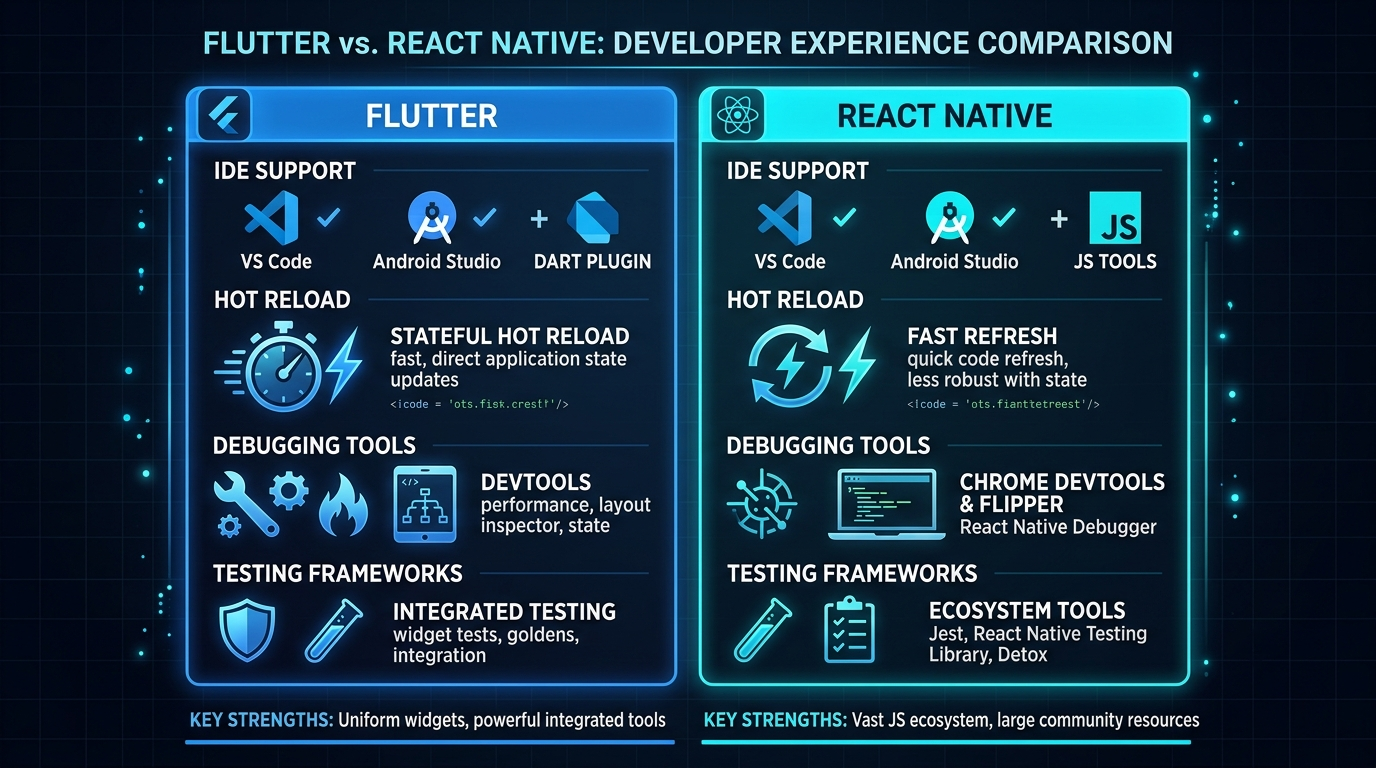
Flutter ships with DevTools — a full debugging suite built by Google with performance profiling, widget inspection, memory tracking, and network monitoring. Hot reload injects code changes in under 300 milliseconds while preserving the entire app state.
React Native benefits from the mature JavaScript tooling ecosystem. Flipper (Meta's debugger), React DevTools, and Chrome DevTools all work out of the box. Hot reload is slightly slower but has improved dramatically with the New Architecture.
IDE Support
Both frameworks have excellent VS Code and JetBrains support. Flutter also has first-party integration with Android Studio. React Native developers often prefer VS Code due to its lighter weight and the TypeScript ecosystem.
Testing
Flutter has a three-tier testing system built in: unit tests, widget tests, and integration tests — all using the flutter_test package with no additional setup.
React Native uses Jest for unit testing and Detox or Maestro for end-to-end testing. The testing ecosystem is powerful but requires assembling multiple tools.
UI and Design Comparison
This is where the philosophical difference between the two frameworks becomes clear.
Flutter gives you a blank canvas. Every pixel is drawn by the Impeller engine. Want a button that looks exactly the same on iOS, Android, and web? That is the default. Want platform-adaptive buttons that look native on each platform? Use CupertinoButton and ElevatedButton conditionally.
React Native gives you native building blocks. Your TextInput is a real UITextField on iOS with all its native behaviors — autocomplete, spell check, haptic feedback. You get platform behavior for free, but visual consistency across platforms requires extra work.
Aspect | Flutter | React Native |
|---|---|---|
Design Philosophy | "Pixel-perfect everywhere" | "Platform-native by default" |
Custom UI Components | Built-in Material 3, Cupertino | Requires styled components or NativeWind |
Animation Framework | Implicit + Explicit animations, Rive | Reanimated 3, Lottie |
Theming |
| Styled-components, NativeWind |
Accessibility | Semantics widget tree | Native accessibility built-in |
For design-heavy apps — think fintech dashboards, creative tools, branded consumer apps — Flutter's rendering model gives you an advantage. For apps that need to feel "native" to each platform — enterprise tools, system utilities, apps that integrate deeply with OS features — React Native is the more natural choice.
Backend Integration
Both frameworks integrate well with modern backends, but the experience differs.
Flutter + Firebase is essentially a first-party integration. FlutterFire is maintained by the Firebase team at Google, which means updates ship fast, documentation is excellent, and the API surface is clean. If your backend is Firebase (Auth, Firestore, Cloud Functions, Storage), Flutter is the smoother path.
// Flutter + Firestore — feels native
final snapshot = await FirebaseFirestore.instance
    .collection('users')
    .where('active', isEqualTo: true)
    .get();
(See: Flutter Firebase Auth with Google Sign-In)
React Native + any backend is where its JavaScript heritage shines. REST APIs, GraphQL (Apollo Client), Supabase, AWS Amplify — the npm ecosystem has a mature client library for virtually every backend service.
// React Native + Supabase — leverage JavaScript ecosystem
const { data, error } = await supabase
  .from('users')
  .select('*')
  .eq('active', true);
AI-Assisted Development in 2026
This is the category that changed the most since 2024. AI tools have fundamentally altered how developers build apps in both frameworks.
Claude Code
Claude Code is Anthropic's command-line tool for agentic coding. It generates entire Flutter widgets, Riverpod providers, and Firestore integration code from natural language descriptions. For Flutter specifically, Claude Code excels at generating architecture scaffolding — clean architecture layers, repository patterns, and state management boilerplate. I use Claude Code prompts as a core part of my development workflow for every production app I build.
GitHub Copilot
Copilot works well with both frameworks. TypeScript's wider training data gives React Native a slight edge in suggestion quality, but Copilot's Flutter/Dart support has improved significantly and handles widget composition, state management patterns, and platform channel code fluently.
Cursor
Cursor IDE has emerged as a favorite among both Flutter and React Native developers. Its codebase-aware completions and inline chat make it particularly useful for large projects where context matters.
The AI Verdict
Both frameworks benefit from AI tools, but React Native has a slight advantage due to JavaScript/TypeScript's larger representation in training data. Flutter closes this gap with dedicated tooling from Google and strong support from Claude Code and Copilot.
Market Demand in 2026
Job Market
Metric | Flutter | React Native |
|---|---|---|
US/CA Job Listings | ~3,200 | ~6,800 |
Average Salary (US, mid-level) | ~$98K–$135K | ~$95K–$130K |
Senior Salary Range (US) | $135K–$180K | $125K–$160K |
Freelance Rate (global) | $50–$120/hr | $45–$100/hr |
Cross-platform Market Share | ~46% | ~35% |
React Native has more job listings today because of its longer market presence and the massive pool of JavaScript developers already working in enterprise environments. Flutter developers are scarcer, which is driving higher salaries for senior roles — a classic supply-and-demand dynamic.
Freelancing
For freelancers, both frameworks open doors to different client segments. Flutter clients tend to be startups, mobile-first companies, and businesses wanting a single codebase for mobile + web. React Native clients tend to be enterprises with existing React web teams who want to extend to mobile.
If you operate in markets like the Middle East and North Africa, South Asia, or Latin America, Flutter has significantly higher adoption and client demand for cross-platform mobile development.
Enterprise Adoption
React Native powers parts of Meta's app suite, Microsoft Office mobile apps, Shopify's mobile stack, and Bloomberg's consumer app. Flutter is used by BMW, Toyota, Google Pay, Alibaba, and eBay. Both frameworks are enterprise-ready. The choice often depends on the existing team's skill set rather than technical capability.
Which Framework Should Beginners Choose?
If you are starting from zero — no programming experience — Flutter is the better entry point. Here is why:
Dart is a cleaner, more consistent language than JavaScript. It has one way to do most things, sound null safety from day one, and excellent error messages. JavaScript's historical quirks (== vs ===, prototype chains, this binding) create unnecessary friction for beginners.
Flutter's widget system teaches you composition, which is the most important concept in modern UI development. Once you understand how to compose widgets in Flutter, you can learn any other UI framework.
However — if you already know JavaScript or React from web development, React Native lets you reuse that knowledge immediately. Do not learn Dart just because someone on the internet said Flutter is better. Leverage what you already know.
Which Framework Should Businesses Choose?
The decision matrix for businesses is straightforward:
Choose Flutter when:
You need one codebase for mobile, web, and desktop
Your app is heavily branded with custom UI/animations
You are building an MVP and need to ship fast on both platforms
Your backend is Firebase or Google Cloud
You are willing to invest in building a Flutter team
Choose React Native when:
Your engineering team already knows React or JavaScript
You need deep native platform integration (Bluetooth, ARKit, HealthKit)
You are hiring aggressively and need a larger talent pool
Your app needs to feel platform-native on each OS
You have an existing React web application to share code with
Which Framework Should Freelancers Choose?
Learn both. Start with one.
If you are freelancing in global markets (Upwork, Toptal, Fiverr), Flutter has higher demand relative to supply — meaning less competition per job. If you are targeting US enterprise clients or agencies, React Native opens more doors because enterprises tend to have JavaScript teams already in place.
My recommendation: pick the one aligned with the clients you want, build two or three production apps with it, then expand to the second framework. A freelancer who can ship in both frameworks is significantly more valuable than one locked into a single stack.
(See: Flutter Clean Architecture with Riverpod and Firestore)
Future Outlook
Flutter's Roadmap
Google continues investing heavily in Flutter. The Impeller engine is now the default renderer, desktop support is stable, and the framework's expansion into embedded systems (IoT, automotive dashboards) opens up new use cases no other cross-platform tool can reach. Google's investment in Gemini AI and its tight coupling with the Dart/Flutter ecosystem suggests deeper AI integration is coming.
React Native's Roadmap
Meta's New Architecture is now the default in React Native 0.84+. The focus is on performance refinement, bridgeless architecture completion, and deeper integration with Meta's own AI tools. The React Server Components pattern from web React is expected to influence React Native's evolution, potentially enabling new patterns for data fetching and rendering.
The Convergence
Both frameworks are becoming more capable and more similar in what they can achieve. The real divergence is in how they achieve it — Flutter through a custom rendering engine and Dart, React Native through native components and JavaScript. This philosophical difference is unlikely to change.
Final Verdict
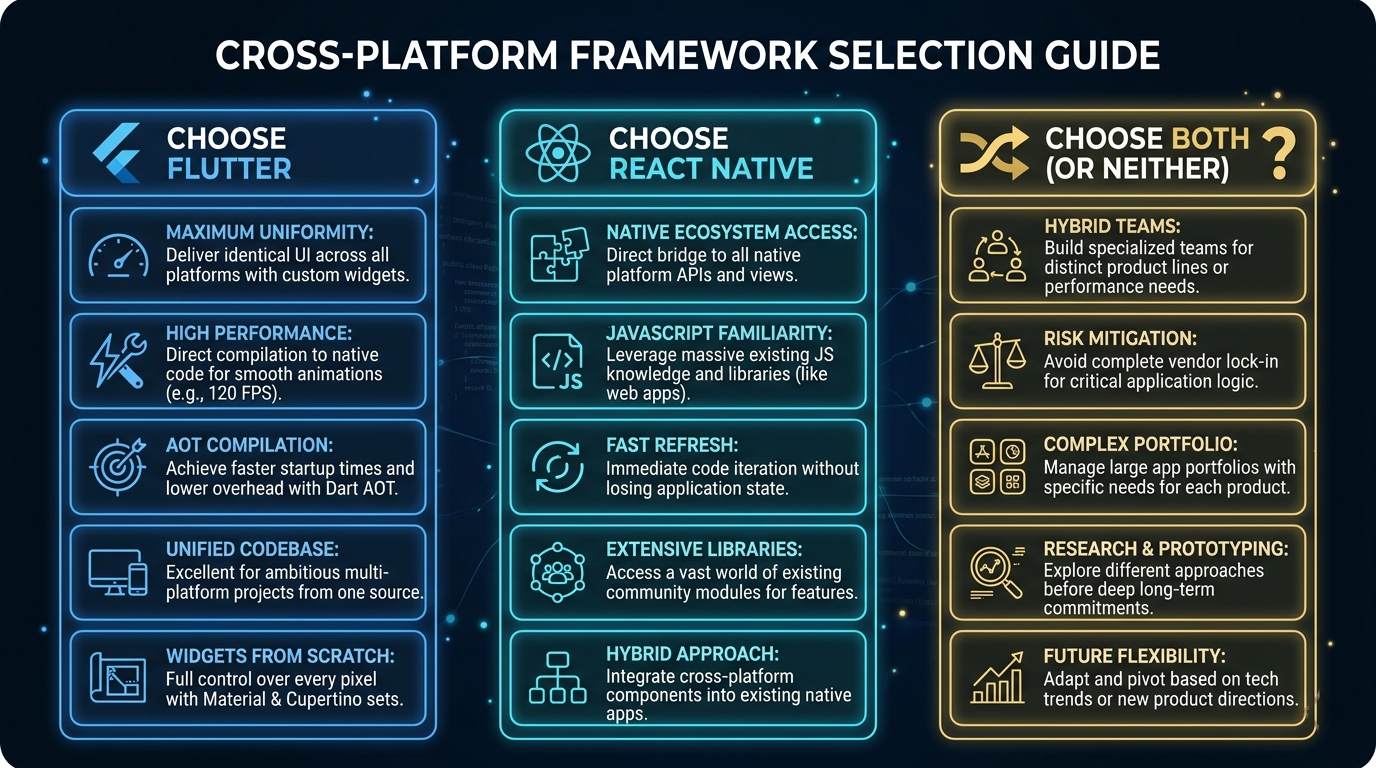
There is no single winner. Here is the honest breakdown:
Flutter wins on: rendering performance, UI consistency, multi-platform reach (mobile + web + desktop), hot reload speed, Firebase integration, and senior developer salary potential.
React Native wins on: job market size, hiring speed, native platform feel, package ecosystem depth, JavaScript team leverage, and enterprise adoption breadth.
Choose Flutter if you are building a new product, want maximum platform coverage, and prioritize UI polish and performance.
Choose React Native if you have JavaScript expertise, need to hire quickly, and want platform-native behavior with minimal extra work.
Choose both if you are a freelancer or consultant who wants to never say no to a client.
The best framework is the one you ship with. Pick one, build something real, and start shipping.
FAQs
1. Is Flutter better than React Native in 2026?
Flutter leads in rendering performance, multi-platform support, and developer satisfaction scores. React Native leads in job availability and ecosystem breadth. Neither is objectively "better" — they serve different needs.
2. Is Flutter replacing React Native?
No. Flutter's market share has grown, but React Native remains firmly established in enterprise and maintains a larger job market. Both frameworks coexist and are actively developed by Google and Meta respectively.
3. Which pays more — Flutter or React Native developer?
Senior Flutter developers in the US earn between $135K–$180K, slightly higher than React Native's $125K–$160K range. This premium reflects the smaller supply of Flutter developers relative to demand.
4. Can I use Flutter for web development?
Yes. Flutter web is production-ready and works well for app-like web experiences, dashboards, and internal tools. It is not ideal for content-heavy SEO websites — use Next.js or Astro for those.
5. Is Dart harder to learn than JavaScript?
Dart is actually easier to learn than JavaScript for beginners due to its cleaner syntax and fewer historical quirks. If you already know JavaScript, the switch to Dart takes about a week of focused practice.
6. Which framework is better for startups?
Both are excellent for startups. Flutter has a slight edge for MVPs because a single developer can ship to iOS, Android, and web from one codebase with pixel-perfect consistency.
7. Does React Native still use a bridge?
No. The New Architecture (default since React Native 0.76+) replaced the asynchronous bridge with a synchronous JavaScript Interface (JSI), eliminating the main performance bottleneck.
8. Which framework has better AI tool support?
React Native has a slight advantage due to JavaScript's larger representation in AI training data. However, Claude Code, GitHub Copilot, and Cursor all support Flutter/Dart effectively.
9. Can I build desktop apps with React Native?
React Native for Windows and macOS exists but is still experimental. Flutter's desktop support for Windows, macOS, and Linux is stable and production-ready.
10. Which framework should I learn first as a complete beginner?
Flutter, if you are starting from scratch. Dart is a cleaner first language, the widget system teaches composable UI patterns, and the single-codebase story is more complete. If you already know JavaScript, start with React Native instead.
Start Building Today
The best way to decide between Flutter and React Native is to build something with each. But if you want a head start with Flutter, check out the growing library of tutorials, guides, and production-tested patterns on bidev.site — from Riverpod state management to clean architecture to Firebase authentication.
Every article is written from real production experience, not recycled documentation. If you're serious about Flutter development, bidev.site is your resource.
Written by Bilal — Flutter developer, founder of bidev.site. Building real apps with Flutter and shipping to production since 2020.